SaaD MaLiK

SaaD MaLiK
Showing posts with label Graphic Softwares. Show all posts

Tuesday, 26 November 2013

Adobe Photoshop CC Version 14.0 ( 32bit and 64bit )

Adobe Photoshop CC is a program for processing raster graphics. Supports numerous graphic formats. Adobe Photoshop allows you to create new images and edit them. Photoshop used to create photorealistic images to work with color scanned images, retouching, color correction, transformation of graphs, color separation, etc. Adobe Photoshop has all the methods of working with bitmaps, in this case is to work with layers and uses contours. The program is the undisputed leader among professional graphic editors due to its widest possibilities, high efficiency and speed. Adobe Photoshop provides all the necessary tools for correcting, editing, preparing images for printing and high quality output.


New features in Photoshop CC are listed below


NEW Easier by Photoshop
Photoshop CC part of Creative Cloud. Therefore, it is available to users all the latest updates, and access to new versions available from the date of issue. Publishing capabilities in the cloud can organize your files on multiple computers. Through integration with the Behance � can share their projects with other users directly from the program Photoshop CC and receive instant feedback on their work from designers from all over the world.

NEW The new "Smart Sharpen"
A variety of textures, sharp contours and clear details. The new "Smart Sharpen" is the most modern technology to increase the sharpness of today. It analyzes the image, allowing you to maximize clarity, and significantly reduce the noise and ghosting to create high-quality images that look natural.

NEW Intelligent increasing sampling
Increase the low resolution image for use in print or image to the size of the average quality of the billboard or poster. A new feature allows you to keep up-sampling detail and sharpness without making noise.

NEW Advanced Features 
As a component of Creative Cloud, Photoshop app gives you all the power of image editing and video editing, and also includes advanced tools for editing three-dimensional objects and analysis of images, previously only available in Photoshop Extended.

NEW Camera Raw 8 and layer support
Apply edits Camera Raw as a filter for layers and files in Photoshop, and then Upgrade layers and files you fit properly. In addition, with the new external module Adobe Camera Raw 8, you can more accurately correct the images, eliminate perspective distortion and create a vignette.

NEW Variable rectangles with rounded corners
This is one of the most requested features. Now you can change the size of the figures, as well as edit them, both before and after its creation. You can even change the radius of the corners of rectangles. If the figure is intended to be placed on a web page, you can export data from the CSS file in order to save time.

NEW Ability to simultaneously select multiple contours and shapes
Increase the efficiency of their business processes, quickly picking contours, shapes and vector masks in just a few clicks of the mouse. Even in a multi-document with a lot of loops can easily find the right path (and layer) directly on the canvas, using the new filter mode.

NEW Image Stabilization camera
Take photos even a moving camera. If the picture is blurry due to the slow shutter speed or a large focal length, the function "Image Stabilization Camera" analyzes the trajectory and restores sharpness.

NEW Expanded support for smart objects
Apply effects, picture blur and plastic materials with the possibility of reversible correction with support for smart objects. Add blur effects, pushing, pulling, wrinkling and swelling pictures or video, while maintaining the ability to go back to the original file. Change or remove the effects whenever you want, even after saving the file.

NEW Improved drawing of three-dimensional objects
When working with three-dimensional objects and textures to create interactive maps of the preview can now be up to 100 times faster. Thanks to the powerful mechanism of drawing in Photoshop, you can create stunning three-dimensional model.

NEW Improved font styles
You spend hours on the whole design of the font. The use of font styles will keep the formatting as a style, and then apply it with one click. You can even specify font styles to be used in all your documents Photoshop.

NEW Copy attributes CSS
When creating a web design code manually, you can always create elements such as rounded corners or color corresponding to the original. Photoshop can now create CSS code for the specific design elements. You only need to copy and paste the code into your web editor to get the desired result.

NEW Conditional action
Automate routine operations using conventional machining operations. To automatically select the different actions based on the rules you create in these commands are used instructions if / then.

NEW Improved panel �3D-scene."
With the ease of changing from two-dimensional to three-dimensional editing thanks to the panel �3D-scene", which contains a set of parameters familiar to you, with whom you have worked before in the "Layers", such as "Duplicate", "Create an instance", "Groups" and "Delete".

NEW features that help save time
Reduce time spent on routine tasks, thanks to the small, but very user-friendly features, users are asked to realize that. Quickly create contours with new keyboard shortcuts, mouse, move the contours of space, include ICC profiles in formats PNG, and more.

NEW Improved 3D-effects
Shadows and reflections can turn your 3D-illustration of a masterpiece, and interactive preview images of higher quality will create memorable works even faster. In addition, you can now easily create glow effects, stage lighting, as well as highlighting the reliefs and textures of higher quality.

NEW Import colors from the web files
Import the color samples directly from files HTML, CSS and SVG. Change these samples as you wish or just use the ready-made color schemes are based on an existing web content.

NEW System font smoothing
With the parameter, which smoothes the corresponding smoothing that is implemented on the Mac or Windows, you can now create realistic previews that allow you to see how a font will look on your web pages.

System Requirements


OS: Windows Xp, Vista, 7, 8, 8.1
System: Pentium 4 Processor 2.8 GHz ( Dual Core Recommended )
Ram: 1 GB ( 2 GB Recommended )
Display: 1024x768 display (1280x800 recommended) with OpenGL 2.0, 16-bit color, and 512MB of VRAM (1GB recommended)

Installation Guide

  1. Extract with WinRAR
  2. Run the setup
  3. After Install Don't Start/Lunch Program
  4. Now Copy Content from from your desire crack folder such as ( 32bit Crack folder OR 64bit Crack folder )
  5. Program Provided for Test Purpose only
  6. If you like this Program, Support Develpers, BUY IT!, The Deserved it!

File Info


Category: Graphics Softwares
Type: PC Software
Language: MultipleLanguage
Total Size: 2.73 GB

Download Adobe Photoshop CC 14.0 in Torrent file


This is Torrent file, If you have not uTorrent then download and install uTorrent

Saturday, 9 November 2013

Adobe Premiere Pro CS3 (Eng) Portable Highly Compressed


Adobe Premiere Pro CS3 software gives you more power to express your creativity. With unparalleled Adobe application integration, revolutionary Adobe Clip Notes, and enhanced HD tools, Adobe Premiere Pro CS3 sets new standards for digital filmmaking.


Top new features

  • Multicam editing
  • Accelerated client review and approval
  • DVD authoring from the timeline
  • Native HDV editing
  • Native SD and HD support
  • Enhanced color-correction tools
  • 10-bit and 16-bit color resolution support
  • 32-bit internal color processing
  • GPU-accelerated rendering
  • Adobe Bridge

Multicam editing image


Edit multiple-camera shoots quickly and easily. View multiple video tracks from a multicam shoot, and edit by switching between tracks in real time. Easily sync clips based on source timecode.

Accelerated client review and approval image


Expedite reviews with Adobe Clip Notes. Embed video into a PDF file, e-mail the file to your client to review with timecode-specific comments, and then view comments mapped to the timeline.

DVD authoring from the timeline image


Create high-quality, menu-driven DVDs directly from the Adobe Premiere Pro timeline. Make full-resolution, interactive DVDs for digital ailies, test discs, or final delivery.

Native HDV editing


Capture and edit HDV content in its original format with no conversion or quality loss. Adobe Premiere Pro CS3 works with popular HDV-format cameras and VTRs.

Native SD and HD support


Capture, edit, and deliver full-resolution SD or HD using native support for the Xena HS real-time encoding card from AJA Video.

Enhanced color-correction tools


Take advantage of new color-correction tools, each optimized for specific tasks. Fast color correction allows for quick and easy adjustments, while secondary color-correction tools allow you to make more selective modifications for a professional finish.

10-bit and 16-bit color resolution support


Maintain source integrity with support for 10-bit video and 16-bit PSD files.

32-bit internal color processing


Maintain maximum image quality with subtle and dramatic changes to color, contrast, and exposure, free of the banding and artifacts caused by lower bit-depth processing.

GPU-accelerated rendering


Adobe Premiere Pro CS3 automatically adjusts to take full advantage of the power of your graphics card, accelerating the preview and rendering of motion, opacity, color, and image distortion effects.

Adobe Bridge image


Browse, organize, and preview content files, and then drag and drop what you need from Adobe Bridge. Search by or edit XMP metadata such as keywords, language, and format.

Screen Shots


Screen Shot 1
Screen Shot 3
Screen Shot 2

Installation Guide

  1. Download and extract it with WinRAR
  2. Enjoy your new fully activated Adobe Premiere Pro CS3 Protable!
  3. simple.. and simple is safe!

File Info


Category: Graphics Softwares
Type: PC Software
Language: English
Total Size: 155 MB
Uploaded by: www.filezooby.com

Password: www.filezooby.com

Thursday, 7 November 2013

Adobe Photoshop CS4 Portable Highly Compressed


Adobe Photoshop CS4 Portable is a Great & Wonderful Selection for you. Adobe Photoshop CS4 Portable is Vervy Easy to use & Very Helpful. Completely Overhauled 3D Engine in Extended version. If you work with 3D, Photoshop Extended is a must-have upgrade; ditto if you think you'd use more of Standard's Tools if the interface were Less opaque, if you need to upgrade other Suite applications, or if you qualify for an academic discount.


Screen Shots


System Requirements


OS: Windows Xp, Vista, 7, 8
System: Pentium 4 Processor 1.5 GHz or faster
Memory:  1 GB


File Info


Category: Graphics Softwares
Type: PC Software
Language: English
Total Size: 62.13 MB
Uploaded by: www.filezooby.com


Password: www.filezooby.com

Friday, 27 September 2013

Pixillion Image Converter 2.28

Pixillion Image Converter is a photo converter software that convert your all kind of photos into your desired size. Pixillion Image Converter has a very simple and straight forward interface. Pixillion image file conversion software is a free image format converter for Windows. It can convert image files between GIF, JPEG, PNG, PDF, and BMP. Before converting your file Pixillion allows you to view the image and current file parameters. When converting Pixillion allows you to flip or rotate and resize. Add text captions and convert from your right click menu.


Installation Guide

  1. Download and Extract with WinRAR
  2. Install setup when finish Installing click finish to complete the setup and the Program will launch Automatically
  3. Close It and make sure It�s not running, And Apply The Reg Patch.

File Info


Category: Graphic Softwares
Type: PC Software
Language: English
Total Size: 259.46 KB
Uploaded by: www.filezooby.com

Password: www.filezooby.com

Monday, 23 September 2013

Adobe Photoshop CS2 Highly Compressed


Adobe Photoshop CS2 is packed with a variety of dramatic and practical enhancements. Perhaps the most exciting new feature is Vanishing Point, a filter with simple tools for drawing grids to define perspective planes in your image. Once Vanishing Point understands the image's angle of perspective, it can automatically distort a layer to match the scene. This makes it a cinch, for example, to map text or images onto the sides of buildings perfectly.
Get ready to explore all that Photoshop CS2 has to offer! Giving you a firm foundation, "Adobe Photoshop CS2 Revealed" allows you to master concepts on both a technical and artistic level. Begin by examining the concept behind each task-the goal and the necessary features that are involved. Then go in-depth with the objective of your task as you study examples and learn the steps necessary to complete it. Working your way through comprehensive, step-by-step lessons, you'll develop the confidence you need to edit your images with ease using Photoshop CS2.


Screen Shots


File Info


Category: Graphics Softwares
Type: PC Software
Language: English
Total Size: 153 MB
Uploaded by: www.filezooby.com


Password: filezooby

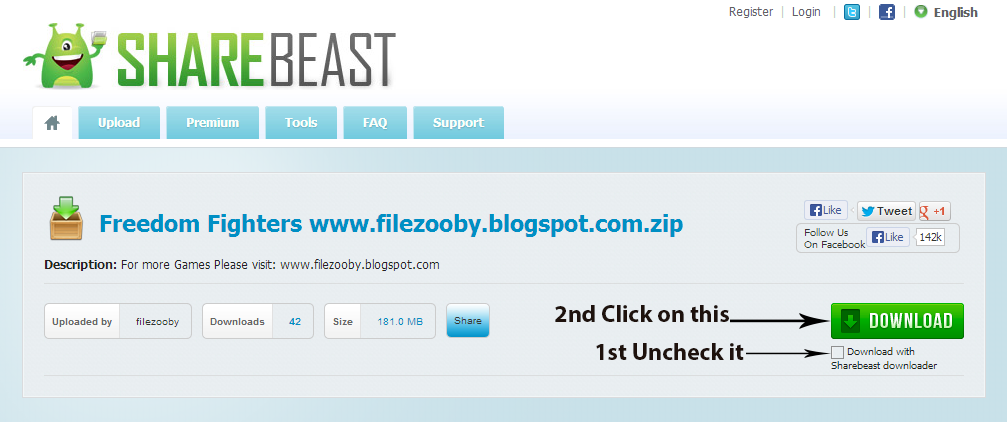
How to Download this Software

Friday, 13 September 2013

Adobe Photoshop 7.0


Adobe Photoshop is a graphics editing program developed and published by Adobe Systems Incorporated.
Adobe's 2003 "Creative Suite" rebranding led to Adobe Photoshop 8's renaming to Adobe Photoshop CS. Thus, Adobe Photoshop CS5 is the 12th major release of Adobe Photoshop. The CS rebranding also resulted in Adobe offering numerous software packages containing multiple Adobe programs for a reduced price. Adobe Photoshop is released in two editions: Adobe Photoshop, and Adobe Photoshop Extended, with the Extended having extra 3D image creation, motion graphics editing, and advanced image analysis features. Adobe Photoshop Extended is included in all of Adobe's Creative Suite offerings except Design Standard, which includes the Adobe Photoshop edition.

Adobe Supports


Adobe only supports Windows and Macintosh versions of Photoshop, but using Wine, Photoshop CS5 can run well on Linux.

Installation Guide

  1. Install the setup wizard and follow all the directions, it will install Adobe Photoshop 7.0
  2. Key is included, just use that to obtain a valid cd key when it asks for it.
  3. Enjoy!!!

File Info


Category: Graphic Softwares
Type: PC Software

Language: English
Total Size: 153 MB
Uploaded by: www.filezooby.com

Screen Shots


Screen Shot 1
Screen Shot 3
Screen Shot 2

Twitter Delicious Facebook Digg Stumbleupon Favorites More