SaaD MaLiK

SaaD MaLiK
Showing posts with label System Utilities. Show all posts

Wednesday, 27 November 2013

Privacy Eraser Pro 9.95

Privacy Eraser Pro 9.95 is an Internet Eraser that protects your Internet privacy by cleaning up all the tracks of Internet and computer activities. Our Internet Eraser supports popular web browsers such as Internet Explorer, Mozilla Firefox, Google Chrome, AOL, Opera and MSN Explorer. Privacy Eraser Pro supports free plug-ins to extend cleaning features, you can easily erase the tracks left by any applications and make your own plug-ins. We currently offer more than 250 FREE plug-ins which supports the most popular programs such as ACDSee, Acrobat, Microsoft Office, KaZaA, Real Player, Media Player and many others.

Privacy Eraser Pro 9.95 is a very useful program for cleaning up the history of your activities on a computer. Maybe you don't realize that Windows and other software programs store information about what you have done, what documents you have used, what web sites you have visited, what images and movies you have seen, and various other activities you have performed. The Windows built-in functions will not protect you, most of the tracks can not be erased with them. Therefore, anyone else can see what you have been doing on your computer, which raises several privacy concerns. Furthermore, much of your activity information takes up valuable disk space, and recovering this space can be very beneficial.


Main Features of Privacy Eraser Pro 9.95

  • Erase Internet Explorer Cache Files
  • Erase Internet Explorer Browser History
  • Erase Internet Explorer Cookies
  • Erase Internet Explorer Address Bar History
  • Erase Internet Explorer Index.dat Files
  • Erase Internet Explorer AutoComplete Memory
  • Erase Windows Recent Documents History
  • Erase Windows Start Menu Run/Find History
  • Erase Windows Recycle Bin
  • Erase Windows Temporary Files Directory
  • Erase Windows MediaPlayer Recent File List
  • Erase Internet history from Google/Yahoo
  • Support Mozilla Firefox, AOL, Netscape and Opera
  • Select which cookies you want to keep
  • File Shredder - Secure delete files & folders
  • Cleaning Free Disk Space - FAT/FAT32/NTFS
  • Scheduled Tasks & Plug-Ins Support
  • Free space on your Hard Drive!
  • Speed up your computer!

Installation Guide

  1. Extarct with WinRAR/WinZip Pro
  2. Run the setup
  3. Use the given key to activate 
  4. Enjoy and Support Developers, Buy It, They Deserved It!

File Info


Category: System Utilities
Type: PC Software
Language: English
Total Size: 2.09 MB
Uploaded by: www.filezooby.blogspot.com

Thursday, 21 November 2013

System Speed Booster 3.0.1.6


System Speed Booster offers abundance of functions to browse your anthology and acknowledgment the aftereffect with corrupt, adverse anthology entries, files and problems, which you can fix by a bang of the Cure button on the accurate and easy-to-use interface. With abounding accretion and whistles offered by Arrangement Speed Booster, you can adore added alluring appearance just with this FREE and space-saved appliance installed on your computer.
System Speed Booster is acutely simple to install and to operate. There is no claim for any annals or any character advice of users. The aeronautics gives you a bright way to adept all its features, including the scanning, curing, and added utilities. As an cutting edge anthology cleaner, Arrangement Speed Booster can altogether cope with the anthology clean, aloofness sweep, clutter files abatement and arrangement enhancement at a time. Specifically, Arrangement Speed Booster focuses on the scanning of the junked anthology entries, alone online histories, anachronistic adverse files, and removing of harder drive trashes, acclimation of arrangement errors. In this way, Arrangement Speed Booster is able to optimize your computer and accumulate it at the needle performance, as able-bodied as to assure your claimed information.

Screen Shots


Screen Shot 1
Screen Shot 3
Screen Shot 2

File Info


Category: System Utilities
Type: PC Software
Language: English
Total Size: 4.81 MB
Uploaded by: www.filezooby.blogspot.com

Wednesday, 20 November 2013

AVG PC Tuneup 2014 v14.0.1001.147

AVG PC Tuneup is an application designed to help you keep the computer in shape by cleaning files that could slow down the operating system and by optimizing some of its settings.


AVG Tunup 2014 Features


Restores your PC to top speed
Remember how fast your PC used to run when you got it? Not only can we help get it back there, but you can also enjoy Turbo Mode to release that extra bit of power when you need it for browsing, gaming and videos.

A Smoother running PC
It�s a bit like having a doctor and cleaner permanently on hand. We�ll help find and fix the gaps and errors that cause your PC problems and clean up as we go.

Extends your battery life
We�ve all been there. You�re just getting to the end of that all-important document and your battery dies. Now you can stop your battery wasting power on things you don�t need so it can last longer.

Frees up valuable disk space
We�ve all got too much clutter on our PC. Half the time we don�t know what it is, if it�s important and or how to delete it. We�ll analyze your PC for all that junk and show you how to get rid of it in a few simple clicks. Result? One faster PC and more space for you.

Keeps your PC at peak performance
Getting fast is all well and good, but not if it only does it once. We continually work in the background, and constantly update the way we tune, to help your PC always run at top speed.

Leaves no trace of your most important files
Hitting the delete button doesn�t always give you that complete peace of mind. Hitting the Shredder button will.

Gives you complete performance � automatically
It�s always good when there�s one thing less to remember. We continually monitor your PC and let you know the status. And we even run routine maintenance when you�re away from your PC so it doesn�t get in the way. Read more

Fine tune your computer for even more performance
If you�re a bit of an expert, then don�t worry. There�s a whole range of tools you can use to fine tune things - just how you want them.

Makes optimization easier
A lot of us wouldn�t know where to start to make our PCs work even better. We take that problem away by making straightforward recommendations and showing how to do them in a few simple clicks.


Screen Shots


File Info


Category: System Utilities

Type: PC Software
Language: Multli Language
Total Size: 52 MB
Uploaded by: www.filezooby.blogspot.com

Installation Guide

  1. Unpack rar archive with WinRAR / Winzip Pro
  2. Run the setup
  3. Copy the crack folder content and paste it to the software installed directory.
  4. Use the given serial key to activate
  5. Enjoy and Support Developers, Buy It, They Deserved It!

Sunday, 17 November 2013

Microsoft .Net Framework


.NET Framework is Microsoft's comprehensive and consistent programming model for building applications that have visually stunning user experiences, seamless and secure communication, and the ability to model a range of business processes.

Screen Shots


Screen Shot 1
Screen Shot 3
Screen Shot 2


.Net Framework 1.1 (All Version)


.Net Framework 2.0 (32bit and 64bit)


.NET Framework 3.0 (32bit and 64bit)


.Net Framework 3.5 (32bit and 64bit)


.NET Framework 4.0 (32bit and 64bit)


.NET Framework 4.5 (32bit and 64bit)


.NET Framework Removal Tool


Saturday, 16 November 2013

Recover4all Pro 2.18


Recover4all Professional is easy to use data recovery software that lets you recover (undelete) files that were accidently deleted under Windows. It does not matter, if the files were removed from the recycle bin or were directly deleted. The program is fast and very easy to use. The deleted files can be restored with a few mouse clicks. To prevent deleted files from becoming overwritten, Recover4all does not require installation and can run directly from a USB disk, flash drive Etc� Recover your data with this easy-to-use software.

Installation Guide


  1. Download it and extract it with WinRAR
  2. Unpack and Install it
  3. Enjoy...

File Info


Category: System Utilities
Type: PC Software
Language: English
Total Size: 345.42 KB
Uploaded by: www.filezooby.com

Password: www.filezooby.com

Advanced Registry Doctor Pro Premium 9.4.08.10


Advanced Registry Doctor Pro Premium is capable of scanning for, diagnosing and curing multiple registry problems, which averts possible malfunctions and crashes, and significantly improves the speed of computer loading and performance. In addition, the program comes with a set of advanced options, like registry defragmenting, built-in scheduler, backup and restore feature, history log and many other perks. The registry is one of the most essential components of Windows OS, critical to proper functioning of any PC computer. Advanced Registry Doctor has several applications designed to contribute to its overall safety. It divides the list of errors into individual categories and offers individual undo functionality as well as a registry backup and system restore function.

Features:

  • Automatic Repair
  • System and Registry Backup
  • Compress or Defrags Registry
  • Quick and Full Registry scan
  • Advanced and Novice modes
  • Individual Undo
  • Scheduling abilities
  • Powerfull customization options

Screen Shots


Screen Shot 1
Screen Shot 3
Screen Shot 2

Installation Guide

  1. Download and Extract with WinRAR
  2. .exe File Format (Setup Full Version)
  3. You now have a much easier installation
  4. Run Application
  5. Click on "Install Now" For Install Software Full Version
  6. Enjoy...

File Info


Category: System Utilities
Type: PC Software
Language: English
Total Size: 6.01 MB
Uploaded by: www.filezooby.com

Password: www.filezooby.com

Tuesday, 12 November 2013

DLL Fixer 3.0.81.2643

DLL Files Fixer Fixes Dll Errors Safely and Easy in an Efficient Way. DllErrorsFix is the best choice for you to fix dll errors in one step which you can hold complete trust on. Get rid of unwanted dll errors that cause freezing, crashing or blue screen of death.

1. Dll Error Free Scan
Free scan & diagnosis your Dll error.

2. User Related Errors
Scan and repair your user related errors.

3. Dll Error Fix and Repair
Fix Dll error like shell32.dll, msvcr71.dll and so on.

4. Other Related Errors
Scan and repair your other related errors.


Other benefits

  • Optimize Registry in smart and invariably the simplest way.
  • Defrag and optimize system Registry.
  • Fix all the problems and create an error-free Registry.
  • Relieve from application, system crashes and PC hang-ups.
  • Prevent from the unwanted prompts appearing time and again.
  • Improve system response time.
  • Speed up system performance.
  • Repair and clean Registry from unwanted and invalid Registry entries

DLL Fixer 3.0.81.2643 Premium Features

  • Resolve .dll related errors and ensure your software runs smoothly.
  • Eliminate .dll related system pop-up error messages.
  • Repair and clean your Registry of unwanted and invalid registry entries.
  • Optimize PC performance and speed up your system with a clean and error-free registry.
  • Defragment your registry to reduce startup time and memory usage.
  • Prevent your applications and PC from crashing.
  • Counteract deterioration over time. 12, 24, 36 months licenses available.
  • Easy to use 2-in-1 interface.

Screen Shots


File Info


Category: System Utilities
Type: PC Software
Language: English
Total Size: 5.20 MB
Uploaded by: www.filezooby.com


Password: www.filezooby.com

Tuesday, 22 October 2013

CCleaner 4.06.4324 (Professional + Business )

CCleaner is the number-one tool for cleaning your Windows PC. It protects your privacy online and makes your computer faster and more secure. CCleaner is easy to use and a small, fast download and user interface has the modern look. CCleaner is a freeware system optimization and privacy tool. Removes unused files from your system � allowing Windows to run faster and freeing up valuable hard disk space. It also cleans traces of your online activities such as your Internet history. CCleaner can run from a USB thumbdrive and be installed/run on a computer without a complicated setup process. It is possible to specify files, folders and registry keys to ignore from the cleaning process. But the best part is that it�s fast.


Cleans the following

  • Internet Explorer
  • Firefox
  • Google Chrome
  • Opera
  • Safari
  • Windows - Recycle Bin, Recent Documents, Temporary files and Log files.
  • Registry cleaner
  • Third-party applications
  • 100% Spyware FREE

CCleaner Features

  • Internet Explorer. Temporary files, history, cookies, super cookies, Autocomplete form history, index.dat files.
  • Firefox. Temporary files, history, cookies, super cookies, download history, form history.
  • Google Chrome. Temporary files, history, cookies, super cookies, download history, form history.
  • Opera. Temporary files, history, cookies, super cookies, download history.
  • Apple Safari. Temporary files, history, cookies, super cookies, form history.
  • Other Supported Browsers. K-Meleon, Rockmelt, Flock, Google Chrome Canary, Chromium, SeaMonkey, Chrome Plus, SRWare Iron, Pale Moon, Phoenix, Netscape Navigator, Avant and Maxthon.
  • Windows. Recycle Bin, Recent Documents, Temporary files, Log files, Clipboard, DNS Cache, Error Reporting, Memory Dumps, Jump Lists.
  • Registry Cleaner. Advanced features to remove unused and old entries, including File Extensions, ActiveX Controls, ClassIDs, ProgIDs, Uninstallers, Shared DLLs, Fonts, Help Files, Application Paths, Icons, Invalid Shortcuts and more�
  • Third-party applications. Removes temp files and recent file lists (MRUs) from many apps including Windows Media Player, eMule, Google Toolbar, Microsoft Office, Nero, Adobe Acrobat, WinRAR, WinAce, WinZip and many more�

What's New in CCleaner 4.06.4324

  • Improved Internet Explorer DOMStore cookie cleaning. 
  • Enhanced Firefox Internet History cleaning. 
  • Added free text entry for include and exclude items. 
  • Optimized Startup tool browser detection. 
  • Updated procedure for recursive folder analysis and cleaning. 
  • Improved system monitoring startup procedure (CCleaner Professional). 
  • Added CDBurnerXP, UltraEdit, Photodex ProShow Producer, SketchUp Make 2013 and HandBrake cleaning. 
  • Minor GUI improvements. 
  • Minor bug fixes.

Screen Shots


Installation Guide

  1. Extract the Ccleaner with WinRAR/WinZip Pro
  2. Run the setup
  3. After Install Don't Start/Lunch Program
  4. Now Copy Content from from your desire crack folder such as (Business Edition Crack folder OR Professional Edition Crack folder)
  5. Enjoy ...
  6. Program Provided for Test Purpose only
  7. If you like this Program, Support Develpers, BUY IT!, The Deserved it!

File Info


Category: System Utilities
Type: PC Software
Language: English
Total Size: 4.14 MB
Uploaded by: www.filezooby.com

Password: www.filezooby.com

Thursday, 10 October 2013

Clean My PC 1.5.7 ( 32bit + 64bit )

Clean My PC helps to Clean PC from unneeded files, system junk and application leftovers. Easy to use yet full-featured Windows Maintenance and Cleaning solution to clean PC.


Clean My PC 1.5.7 Features


1. Scanning
During a scan CleanMyPC analyzes your hard drive to find files which might be safely removed. They are split into four categories - "Caches & Logs???, "Help Files???, "Extra Languages??? and "Trash & Junk???. Let?s walk through them to explain what exactly is found.
2. Caches & Logs
While Windows and applications run on your computer they usually store chunks of "prepared??? data on the hard drive to expedite load. Those chunks are called "Cache files???. However, sometimes these applications do not remove the files and while some apps come with built-in "cache control mechanisms???, the majority of those (including the Windows itself) leave a significant amount of data sitting unneeded on your hard drive. CleanMyPC can identify those files and let you know which of them are safe to delete. Log files record the activity of Windows and applications and are usually used for informational purposes. Removing them will not affect the functionality of your applications but might recover you hard drive space.
3. Help Files
Most applications (as well as Windows itself) come with help files which contain information about program functionality and workflow. You can safely remove help files for the applications that you already use freely. CleanMyPC allows you to selectively remove help files by clicking the corresponding "Help Files??? section of the sidebar and checking only those you want removed.
4. Extra Languages
Some applications also come with built-in language translations (for example Spanish, Russian or German). This only influences interface translations - you can still type text in any language within the app. Since you only want your application in one language you can safely remove the rest - gaining free space. CleanMyPC will scan your computer and find applications which have multiple language translations, offering you to remove extras. If needed, you can only check those application translations you want cleaned.
5. Trash and Junk
In this section CleanMyPC scans for various files you can?t usually access on your own but still can remove. These are:
  • "Restore points??? (backup files created by Windows. The latest restore point will not be removed by CleanMyPC to ensure you can always recover your system).
  • "Recycle Bin??? folders located on all your hard drives.
  • "Crash reports??? - files created by applications and Windows when something crashes, application quits or a critical error occurs.
6. Additional Utilities
In addition to cleaning and scanning features CleanMyPC comes with a set of built-in utilities which are aimed to help you keep your computer reliable, fast, clean and working like a new one.
7. Secure Erase
When you simply remove files to and from Recycle Bin they can still be brought back by third party data recovery software. Yet sometimes you need to remove files for good - and this is where CleanMyPC?s "Secure Erase??? will help you. Files and folders removed with "Secure Erase??? cannot be recovered. This is achieved by rewriting files with zeroes ("zero-out multiple times before permanently removing them from your hard drive.
8. Complete Uninstall
Most applications you have on your computer come with a dedicated uninstaller which removes the application you decide to stop using from your system. However, some files (like application preferences, caches, data etc.) are not usually deleted along with the app and clutter your system occupying disk space and slowing your computer down. CleanMyPC?s "Complete Uninstall??? feature will help you to remove applications without leaving a trace. To do so you need to follow the on-screen instructions to launch a factory uninstaller and after it finishes its job CleanMyPC will pick it up and proceed with removing unneeded leftovers.
9. Registry Cleanup
The Windows registry is a database that stores configuration settings and options for Windows itself and for all installed applications. Since registry is simultaneously read and written by all the installed applications which can also include malware and spyware programs, it sometimes becomes cluttered or partially corrupted. This cannot be fixed manually (unless you have deep technical knowledge and experience) and we advise to let CleanMyPC?s registry maintenance utility to take care of your registry. To scan your computer?s registry for issues click "New Registry Scan??? and wait for the scan to finish. CleanMyPC will find erroneous entries and offer you to fix them all at once or selectively.
10. Autorun
While launching applications automatically with Windows is convenient some applications might do that without your knowledge and you might want to prevent them from automatically running. Removing applications from autorun manually is usually not convenient and sometimes beyond your control - Windows stores autorun data in several places and locating a specific application might be tricky. CleanMyPC collects all applications which start with Windows into one simple interface - simply hover any application and click the corresponding "Disable??? button to prevent it from starting with Windows. You can re-enable it again in the same way.
11. Gadgets & Extensions Manager
Windows (and some applications) install different Gadgets and Extensions onto your system. While some applications provide you with removal options, sometimes you don?t have such a possibility (which is especially habitual for default Windows gadgets and extensions). CleanMyPC lists all the extensions you can remove and allows you to remove all at once or only those you want to get rid of. This cannot be undone so please make sure you don?t remove gadgets or extensions you might need in the future.


Screen Shots


Installation Guide

  1. Unpack rar archive
  2. Run the setup 
  3. Copy the crack folder content and paste it to the software installed directory.
  4. Enjoy and Support Developers, Buy It, They Deserved It!

File Info


Category: System Utilities

Type: PC Software
Language: English
Total Size: 21.36 MB
Uploaded by: www.filezooby.com

Password: www.filezooby.com

Friday, 27 September 2013

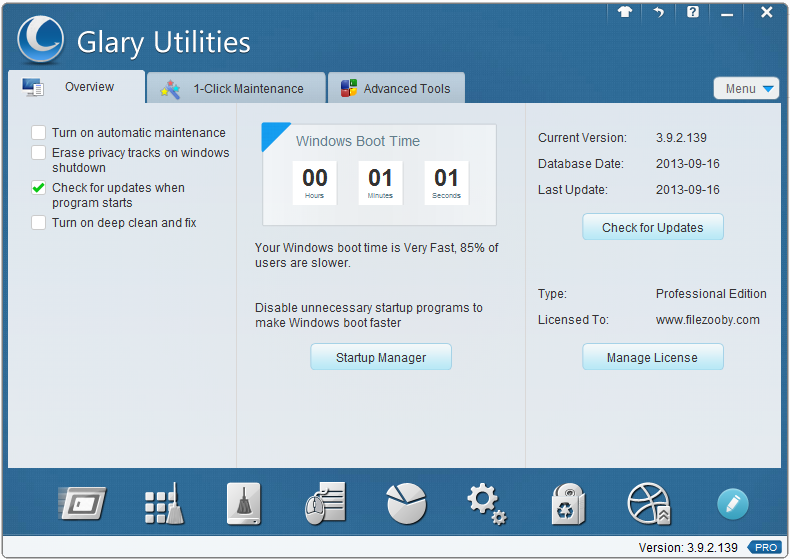
Glary Utilities 3.9.2.139

Glary Utilities is a collection of system tweaking and utilities for tweaking , improving overall productivity and protect your PC. This application allows the user to get rid of unnecessary files from the old records and the history of Internet activity , by installing various plugins, one can achieve full compatibility of applications with more than 45 different programs . Furthermore , Glary Utilities will optimize the use of system memory, search .
Glary Utilities is a collection of system tools and utilities to fix, speed up, maintain and protect your PC. It allows you to clean common system junk files, as well as invalid registry entries and Internet traces (theres a plug-in support for 45 + external programs). You can also manage and delete browser add-ons, analyze disk space usage and find duplicate files.


A set of tools

  • Disk Cleaner - Removes junk data from your disks and recovers disk space
  • Registry Cleaner - Clean Registry Scan and clean up your registry to improve system performance.
  • Shortcuts Fixer - Corrects the errors in your startmenu & desktop shortcuts
  • Uninstall Manager - Uninstalls programs completely that you do not need any more
  • Startup Manager - Manages programs which run automatically run
  • Memory Optimizer - Monitors and optimizes free memory in the background
  • Context Menu Manager - Manager context menu controls context menu for files , folders ...
  • Tracks Eraser - Erases all the traces of the Internet : Events, cookies, internet history ...
  • File Shredder - Erases files permanently so that no possibility of recovery.
  • File Undelete - Quick and effective way to restore accidentally deleted files
  • File Encrypter and Decrypter - Protects your files from unauthorized access and use.
  • Disk Analyzer - Display disk space occupied by files and folders.
  • Search for duplicate files - Finds and removes empty folders and duplicated
  • File Splitter and Joiner - Splits large files into smaller manageable , and then rejoin .
  • Process Manager - Monitors programs that run on your computer , and blocking software - Spyware and Trojans.
  • Assistant Internet Explorer - Manages Internet Explorer Add-
  • Windows Standard Tools - Provides direct access to the useful functions of the windows settings to the default

New in Glary Utilities 3

  1. Glary New design
  2. New and innovative design that provides easy-to- use and intuitive interface.
  3. Glary 20 + Premium tools.
  4. Includes over 20 system utilities to improve computer performance.
  5. Glary Faster .
  6. Scanning and analysis of your problems is eight times bigger, faster and more thoroughly than before.

Screen Shots


File Info


Category: System Utilities
Type: PC Software
Language: English
Total Size: 15.6 MB
Uploaded by: www.filezooby.com

Password: www.filezooby.com

Thursday, 26 September 2013

CCleaner 3.1.7 Professional PreActivated


CCleaner is a freeware system optimization, privacy and cleaning tool. It removes unused files from your system - allowing Windows to run faster and freeing up valuable hard disk space. It also cleans traces of your online activities such as your Internet history. Additionally it contains a fully featured registry cleaner. But the best part is that it's fast (normally taking less than a second to run) and contains NO Spyware or Adware!

Features

  • (Build 1689) fixed bug in Windows Media Player.
  • Added wildcard support for Cookie cleaning.
  • Improved Google Chrome Saved Form Information cleaning.
  • Improved Google Chrome History cleaning for Search Engines.
  • Added Hosts history cleaning in Aurora.
  • Added Shortcuts history cleaning in Google Chrome Canary.
  • Improved JumpList menu to avoid possible UI lock.
  • Improved option to close running browsers when cleaning.
  • Improved IE AutoComplete Form History and Saved Passwords cleaning.
  • Improved shortcut cleaning in Windows 8.
  • Added cleaning for CyberLink PhotoDirector 10, DivX player and Snagit 11.
  • Improved cleaning for Vuze, Windows Media Center, Windows Media Player,
  • Corel VideoStudio Pro X4 and Game Explorer.
  • Improved BitTorrent detection.
  • Minor bug fixes and improvements.

Screen Shots


Screen Shot 1
Screen Shot 3
Screen Shot 2


File Info


Category: System Utilities
Type: PC Software
Language: English
Total Size: 2.41 MB
Uploaded by: www.filezooby.com


Password: www.filezooby.com

CCleaner Business Edition 3.16.1666 PreActivated


CCleaner Business Edition is the easiest way to make your PC instantly faster. It makes PCs run Clean, Safe and Fast! Whether you have a single computer or several, deploy CCleaner Business Edition in your office for a dramatic improvement in productivity and computer safety.

Features

  • Added Scheduled Task management in Startup tool.
  • Added Option to close running browsers when cleaning.
  • Improved Google Chrome History cleaning.
  • Improved Aurora History cleaning.
  • Improved Windows 8 compatibility.
  • Added cleaning for AIMP 3, Corel VideoStudio Pro X4 and AlZip.
  • Improved cleaning for Snagit 10, AntiVir Desktop, Ashampoo Burning Studio 11, and
  •  Adobe Acrobat 9.0 and 10.0.
  • Reduced 64-bit EXE memory usage.
  • Minor GUI improvements.
  • Instantly faster PC
  • One-Click cleaning
  • Faster web browsing
  • Eliminates tracking info and super cookies
  • Faster PC boot up
  • Get 'like new' performance without buying new PC
  • Millions of users worldwide

Cleans the following


  • Internet Explorer
  • Firefox
  • Google Chrome
  • Opera
  • Safari
  • Windows - Recycle Bin, Recent Documents, Temporary files and Log files.
  • Regcleaner
  • Third Party Applications
  • 100% Spyware FREE

    Screen Shots


    Installation Guide

    1. Install CCleaner.Business.Edition.exe
    2. Then install ccsetup316.exe that is loacted in the UPDATA folder
    3. Enjoy!!!

    File Info


    Category: System Utilities
    Type: PC Software
    Language: English
    Total Size: 5.83 MB
    Uploaded by: www.filezooby.com

    Password: www.filezooby.com

    Twitter Delicious Facebook Digg Stumbleupon Favorites More